
네트워크 인프라의 안정성을 확보하기 위해서는 실시간 모니터링이 필수이다. 이번에느 프로메테우스(Prometheus)로 네트워크 메트릭을 수집하고, 그라파나(Grafana)로 시각화하는 방법을 적어보았다.
아키텍처 개요
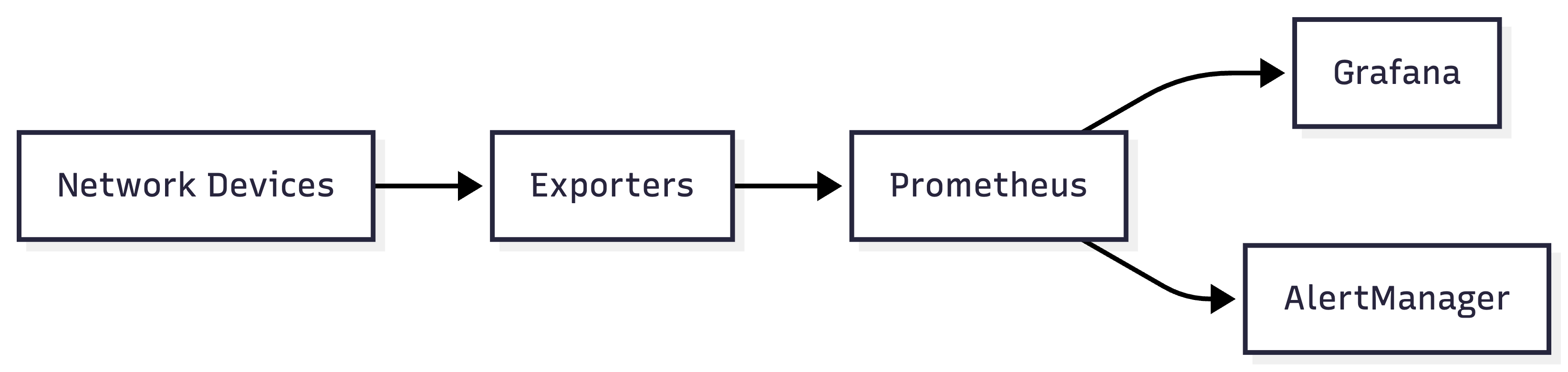
- Exporters: 네트워크 장비에서 메트릭 수집
- Prometheus: 시계열 데이터베이스로 메트릭 저장
- Grafana: 대시보드를 통한 시각화
- AlertManager: 임계값 기반 알림 전송
1. 환경 구성
1.1 Docker Compose로 통합 구성
version: '3.8'

services:
  prometheus:
    image: prom/prometheus:latest
    container_name: prometheus
    volumes:
      - ./prometheus/prometheus.yml:/etc/prometheus/prometheus.yml
      - prometheus-data:/prometheus
    command:
      - '--config.file=/etc/prometheus/prometheus.yml'
      - '--storage.tsdb.path=/prometheus'
      - '--storage.tsdb.retention.time=30d'
    ports:
      - "9090:9090"
    restart: unless-stopped

  grafana:
    image: grafana/grafana:latest
    container_name: grafana
    volumes:
      - grafana-data:/var/lib/grafana
      - ./grafana/provisioning:/etc/grafana/provisioning
    environment:
      - GF_SECURITY_ADMIN_PASSWORD=admin
      - GF_USERS_ALLOW_SIGN_UP=false
    ports:
      - "3000:3000"
    restart: unless-stopped
    depends_on:
      - prometheus

  snmp-exporter:
    image: prom/snmp-exporter:latest
    container_name: snmp-exporter
    volumes:
      - ./snmp-exporter/snmp.yml:/etc/snmp_exporter/snmp.yml
    ports:
      - "9116:9116"
    restart: unless-stopped

  blackbox-exporter:
    image: prom/blackbox-exporter:latest
    container_name: blackbox-exporter
    volumes:
      - ./blackbox-exporter/config.yml:/etc/blackbox_exporter/config.yml
    ports:
      - "9115:9115"
    restart: unless-stopped

volumes:
  prometheus-data:
  grafana-data:
1.2 프로메테우스 설정
prometheus/prometheus.yml:
global:
  scrape_interval: 15s
  evaluation_interval: 15s
  external_labels:
    cluster: 'production'
    region: 'ap-northeast-2'

alerting:
  alertmanagers:
    - static_configs:
        - targets: ['alertmanager:9093']

scrape_configs:
  # SNMP Exporter - 네트워크 스위치/라우터
  - job_name: 'network-switches'
    static_configs:
      - targets:
          - 192.168.1.10  # Switch-1
          - 192.168.1.11  # Switch-2
          - 192.168.1.12  # Router-1
    metrics_path: /snmp
    params:
      module: [if_mib]
    relabel_configs:
      - source_labels: [__address__]
        target_label: __param_target
      - source_labels: [__param_target]
        target_label: instance
      - target_label: __address__
        replacement: snmp-exporter:9116

  # Blackbox Exporter - 네트워크 연결성 체크
  - job_name: 'blackbox-icmp'
    metrics_path: /probe
    params:
      module: [icmp]
    static_configs:
      - targets:
          - 8.8.8.8          # Google DNS
          - 1.1.1.1          # Cloudflare DNS
          - 192.168.1.1      # Gateway
    relabel_configs:
      - source_labels: [__address__]
        target_label: __param_target
      - source_labels: [__param_target]
        target_label: instance
      - target_label: __address__
        replacement: blackbox-exporter:9115

  # Blackbox Exporter - HTTP/HTTPS 모니터링
  - job_name: 'blackbox-http'
    metrics_path: /probe
    params:
      module: [http_2xx]
    static_configs:
      - targets:
          - https://example.com
          - https://api.example.com
    relabel_configs:
      - source_labels: [__address__]
        target_label: __param_target
      - source_labels: [__param_target]
        target_label: instance
      - target_label: __address__
        replacement: blackbox-exporter:9115

  # Node Exporter - 서버 메트릭
  - job_name: 'node-exporter'
    static_configs:
      - targets:
          - 'node-exporter:9100'
2. SNMP Exporter 설정
SNMP(Simple Network Management Protocol)를 통해 네트워크 장비에서 메트릭을 수집합니다.
2.1 SNMP Exporter 설정 파일
snmp-exporter/snmp.yml:
if_mib:
  walk:
    - 1.3.6.1.2.1.2.2.1.2   # ifDescr
    - 1.3.6.1.2.1.2.2.1.10  # ifInOctets
    - 1.3.6.1.2.1.2.2.1.16  # ifOutOctets
    - 1.3.6.1.2.1.2.2.1.14  # ifInErrors
    - 1.3.6.1.2.1.2.2.1.20  # ifOutErrors
    - 1.3.6.1.2.1.2.2.1.8   # ifOperStatus

  metrics:
    - name: ifInOctets
      oid: 1.3.6.1.2.1.2.2.1.10
      type: counter
      help: The total number of octets received on the interface
      indexes:
        - labelname: ifIndex
          type: gauge

    - name: ifOutOctets
      oid: 1.3.6.1.2.1.2.2.1.16
      type: counter
      help: The total number of octets transmitted out of the interface
      indexes:
        - labelname: ifIndex
          type: gauge

    - name: ifOperStatus
      oid: 1.3.6.1.2.1.2.2.1.8
      type: gauge
      help: The current operational state of the interface
      indexes:
        - labelname: ifIndex
          type: gauge
2.2 네트워크 장비 SNMP 활성화
Cisco 스위치 예시:
configure terminal
snmp-server community public RO
snmp-server location Seoul-DC1
snmp-server contact netadmin@example.com
end
3. Blackbox Exporter 설정
네트워크 연결성과 서비스 가용성을 체크합니다.
blackbox-exporter/config.yml:
modules:
  # ICMP 핑 체크
  icmp:
    prober: icmp
    timeout: 5s
    icmp:
      preferred_ip_protocol: ip4

  # HTTP 200 응답 체크
  http_2xx:
    prober: http
    timeout: 5s
    http:
      valid_http_versions: ["HTTP/1.1", "HTTP/2.0"]
      valid_status_codes: [200]
      method: GET
      follow_redirects: true
      preferred_ip_protocol: ip4

  # TCP 포트 체크
  tcp_connect:
    prober: tcp
    timeout: 5s
    tcp:
      preferred_ip_protocol: ip4

  # DNS 체크
  dns_check:
    prober: dns
    timeout: 5s
    dns:
      query_name: example.com
      query_type: A
      valid_rcodes:
        - NOERROR
4. 그라파나 대시보드 구성
4.1 데이터 소스 추가
그라파나 접속 후 (http://localhost:3000):
- Configuration → Data Sources
- Add data source → Prometheus
- URL: http://prometheus:9090
- Save & Test
4.2 네트워크 트래픽 대시보드 쿼리
인터페이스별 트래픽 (bps)
# Inbound traffic
rate(ifInOctets[5m]) * 8

# Outbound traffic
rate(ifOutOctets[5m]) * 8
에러율 계산
# Inbound error rate
rate(ifInErrors[5m]) / rate(ifInOctets[5m]) * 100

# Outbound error rate
rate(ifOutErrors[5m]) / rate(ifOutOctets[5m]) * 100
패킷 손실률
# ICMP probe success rate
avg_over_time(probe_success{job="blackbox-icmp"}[5m]) * 100
응답 시간 (Latency)
# ICMP probe duration
probe_duration_seconds{job="blackbox-icmp"} * 1000
HTTP 가용성
# HTTP probe success
probe_success{job="blackbox-http"}

# HTTP response time
probe_http_duration_seconds{job="blackbox-http"}
4.3 대시보드 JSON 예시
{
  "dashboard": {
    "title": "Network Monitoring Dashboard",
    "panels": [
      {
        "title": "Network Traffic (Mbps)",
        "targets": [
          {
            "expr": "rate(ifInOctets[5m]) * 8 / 1000000",
            "legendFormat": "{{instance}} - In"
          },
          {
            "expr": "rate(ifOutOctets[5m]) * 8 / 1000000",
            "legendFormat": "{{instance}} - Out"
          }
        ],
        "type": "graph"
      },
      {
        "title": "Interface Status",
        "targets": [
          {
            "expr": "ifOperStatus",
            "legendFormat": "{{instance}}"
          }
        ],
        "type": "stat",
        "valueMappings": [
          {"value": 1, "text": "UP"},
          {"value": 2, "text": "DOWN"}
        ]
      }
    ]
  }
}
5. 알람 설정
5.1 프로메테우스 Alert Rules
prometheus/alerts.yml:
groups:
  - name: network_alerts
    interval: 30s
    rules:
      # 인터페이스 다운 감지
      - alert: NetworkInterfaceDown
        expr: ifOperStatus == 2
        for: 2m
        labels:
          severity: critical
        annotations:
          summary: "Network interface down on {{ $labels.instance }}"
          description: "Interface {{ $labels.ifDescr }} is down for more than 2 minutes"

      # 높은 에러율
      - alert: HighNetworkErrors
        expr: rate(ifInErrors[5m]) > 100
        for: 5m
        labels:
          severity: warning
        annotations:
          summary: "High network errors on {{ $labels.instance }}"
          description: "Error rate is {{ $value }} errors/sec"

      # 높은 대역폭 사용률
      - alert: HighBandwidthUsage
        expr: rate(ifInOctets[5m]) * 8 / 1000000000 > 0.8
        for: 10m
        labels:
          severity: warning
        annotations:
          summary: "High bandwidth usage on {{ $labels.instance }}"
          description: "Bandwidth usage is {{ $value }}Gbps (>80%)"

      # 핑 실패
      - alert: HostDown
        expr: probe_success{job="blackbox-icmp"} == 0
        for: 2m
        labels:
          severity: critical
        annotations:
          summary: "Host {{ $labels.instance }} is down"
          description: "ICMP probe failed for more than 2 minutes"

      # HTTP 서비스 장애
      - alert: HTTPServiceDown
        expr: probe_success{job="blackbox-http"} == 0
        for: 1m
        labels:
          severity: critical
        annotations:
          summary: "HTTP service {{ $labels.instance }} is down"
          description: "HTTP probe failed"

      # 높은 레이턴시
      - alert: HighLatency
        expr: probe_duration_seconds{job="blackbox-icmp"} > 0.1
        for: 5m
        labels:
          severity: warning
        annotations:
          summary: "High latency to {{ $labels.instance }}"
          description: "Latency is {{ $value }}s (>100ms)"
5.2 AlertManager 설정
alertmanager/config.yml:
global:
  resolve_timeout: 5m
  slack_api_url: 'https://hooks.slack.com/services/YOUR/WEBHOOK/URL'

route:
  group_by: ['alertname', 'cluster', 'service']
  group_wait: 10s
  group_interval: 10s
  repeat_interval: 12h
  receiver: 'slack-notifications'
  routes:
    - match:
        severity: critical
      receiver: 'slack-critical'
      continue: true
    - match:
        severity: warning
      receiver: 'slack-warnings'

receivers:
  - name: 'slack-notifications'
    slack_configs:
      - channel: '#monitoring'
        title: 'Alert: {{ .GroupLabels.alertname }}'
        text: '{{ range .Alerts }}{{ .Annotations.description }}{{ end }}'

  - name: 'slack-critical'
    slack_configs:
      - channel: '#alerts-critical'
        title: '🚨 CRITICAL: {{ .GroupLabels.alertname }}'
        text: '{{ range .Alerts }}{{ .Annotations.summary }}\n{{ .Annotations.description }}{{ end }}'
        send_resolved: true

  - name: 'slack-warnings'
    slack_configs:
      - channel: '#alerts-warning'
        title: '⚠️ WARNING: {{ .GroupLabels.alertname }}'
        text: '{{ range .Alerts }}{{ .Annotations.summary }}{{ end }}'
6. 실행 및 검증
6.1 서비스 시작
# Docker Compose로 전체 스택 실행
docker-compose up -d

# 로그 확인
docker-compose logs -f prometheus
docker-compose logs -f grafana
6.2 접속 확인
- 프로메테우스: http://localhost:9090
- 그라파나: http://localhost:3000 (admin/admin)
- SNMP Exporter: http://localhost:9116
- Blackbox Exporter: http://localhost:9115
6.3 메트릭 수집 확인
프로메테우스 UI에서 쿼리 테스트
# 모든 네트워크 인터페이스 상태
ifOperStatus

# 최근 5분간 트래픽
rate(ifInOctets[5m])

# 핑 성공 여부
probe_success
7. 최적화 팁
7.1 성능 튜닝
# prometheus.yml
global:
  scrape_interval: 30s      # 수집 간격 조정
  scrape_timeout: 10s       # 타임아웃 설정

storage:
  tsdb:
    retention.time: 30d     # 보관 기간
    retention.size: 50GB    # 최대 크기
7.2 쿼리 최적화
# 좋은 예: aggregation 먼저
sum(rate(ifInOctets[5m])) by (instance)

# 나쁜 예: 전체 데이터 먼저 조회
rate(ifInOctets[5m])
7.3 보안 강화
# 그라파나 환경변수
GF_SECURITY_ADMIN_PASSWORD: ${ADMIN_PASSWORD}
GF_SERVER_CERT_FILE: /etc/grafana/ssl/cert.pem
GF_SERVER_CERT_KEY: /etc/grafana/ssl/key.pem
GF_SERVER_PROTOCOL: https
마치며
프로메테우스와 그라파나를 이용한 네트워크 모니터링의 장점은 확실히 명확한 것 같다.
- 실시간 가시성: 실시간 네트워크 상태를 파악
- 장애 조기 발견: 다양한 알람을 통한 대응
- 성능 분석: 트래픽 패턴 및 병목 지점 식별
- 확장성: 대규모 인프라에도 적용 가능
시스템을 단계적으로 구축하며, 필요에 따라 추가 exporter(예: nginx-exporter, node-exporter) 등을 통합할 수 있다.
참고 자료
'DevOps > 모니터링' 카테고리의 다른 글
| [모니터링] - 그라파나 알림 매니저 (Grafana AlertManager) 활용하기 (0) | 2024.02.16 |
|---|---|
| [모니터링] - Node.js로 그라파나에서 DB 데이터 로그 보기 (0) | 2024.02.16 |
| [모니터링] - Grafana + Prometheus + cAdvisor로 컨테이너 상태(리소스) 수집하기 (0) | 2024.02.16 |
| [DevOps] - Jenkins와 Spring Boot로 구축하는 CI/CD 파이프라인 (0) | 2024.02.16 |
| [모니터링] - Grafana Loki로 도커 컨테이너 로그 보기 (0) | 2024.02.15 |
