
Grafana AlertManager 는 그라파나에서 발생하는 알림을 중앙에서 관리하고 라우팅하는 시스템이다. 중복 제거, 그룹화, 알림 억제? 등의 기능으로 쉽게 알림 관리가 가능하다.
1. Grafana Alerting vs Prometheus AlertManager
차이점
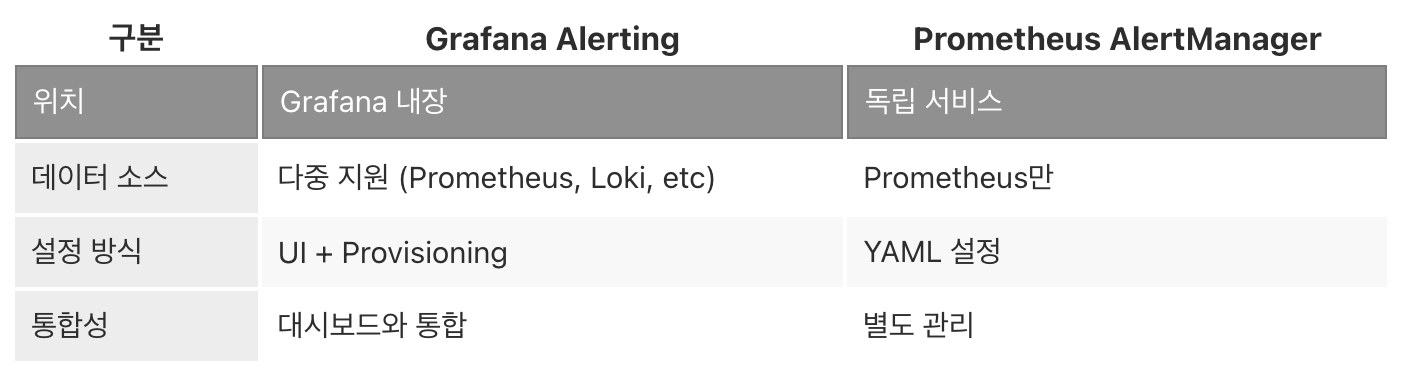
Prometheus AlertManager 보다는 Grafana 내장 Alerting 을 중심으로 정리해보았다.
2. 환경 구성
2.1 Docker Compose 설정
version: '3.8'

services:
  grafana:
    image: grafana/grafana:latest
    container_name: grafana
    ports:
      - "3000:3000"
    environment:
      - GF_SECURITY_ADMIN_PASSWORD=admin
      - GF_ALERTING_ENABLED=true
      - GF_UNIFIED_ALERTING_ENABLED=true
    volumes:
      - grafana-data:/var/lib/grafana
      - ./grafana/provisioning:/etc/grafana/provisioning
    restart: unless-stopped

  prometheus:
    image: prom/prometheus:latest
    container_name: prometheus
    ports:
      - "9090:9090"
    volumes:
      - ./prometheus/prometheus.yml:/etc/prometheus/prometheus.yml
      - prometheus-data:/prometheus
    command:
      - '--config.file=/etc/prometheus/prometheus.yml'
      - '--storage.tsdb.path=/prometheus'
    restart: unless-stopped

volumes:
  grafana-data:
  prometheus-data:
2.2 Grafana 설정 파일
grafana/grafana.ini
[alerting]
enabled = true

[unified_alerting]
enabled = true
execute_alerts = true
evaluation_timeout = 30s
max_attempts = 3

[unified_alerting.state_history]
enabled = true
backend = annotations

[smtp]
enabled = true
host = smtp.gmail.com:587
user = your-email@gmail.com
password = your-app-password
from_address = alerts@example.com
from_name = Grafana Alerts
3. 알림 규칙 생성
3.1 UI를 통한 알림 생성
단계
- Grafana 접속 → Alerting → Alert rules
- "New alert rule" 클릭
- 규칙 설정
3.2 알림 쿼리 예시
CPU 사용률 알림
# Query A
avg(rate(node_cpu_seconds_total{mode!="idle"}[5m])) by (instance) * 100

# Condition
WHEN last() OF A IS ABOVE 80
메모리 사용률 알림
# Query
(1 - (node_memory_MemAvailable_bytes / node_memory_MemTotal_bytes)) * 100

# Condition
WHEN avg() OF query(A, 5m, now) IS ABOVE 90
디스크 공간 알림
# Query
(1 - (node_filesystem_avail_bytes{fstype!="tmpfs"} / node_filesystem_size_bytes)) * 100

# Condition
WHEN last() OF A IS ABOVE 85
HTTP 응답 시간 알림
# Query
histogram_quantile(0.95, rate(http_request_duration_seconds_bucket[5m]))

# Condition
WHEN last() OF A IS ABOVE 2
3.3 Provisioning을 통한 알림 설정
grafana/provisioning/alerting/alerts.yaml
apiVersion: 1

groups:
  - name: system_alerts
    interval: 1m
    rules:
      - uid: high_cpu_alert
        title: High CPU Usage
        condition: A
        data:
          - refId: A
            queryType: prometheus
            relativeTimeRange:
              from: 300
              to: 0
            datasourceUid: prometheus-uid
            model:
              expr: avg(rate(node_cpu_seconds_total{mode!="idle"}[5m])) * 100
              refId: A
        noDataState: NoData
        execErrState: Alerting
        for: 5m
        annotations:
          summary: "CPU usage is above 80%"
          description: "Instance {{ $labels.instance }} CPU usage is {{ $value }}%"
        labels:
          severity: warning
          team: infrastructure

      - uid: low_disk_space
        title: Low Disk Space
        condition: B
        data:
          - refId: A
            queryType: prometheus
            relativeTimeRange:
              from: 600
              to: 0
            datasourceUid: prometheus-uid
            model:
              expr: (1 - (node_filesystem_avail_bytes / node_filesystem_size_bytes)) * 100
              refId: A
          - refId: B
            queryType: ""
            relativeTimeRange:
              from: 0
              to: 0
            datasourceUid: __expr__
            model:
              conditions:
                - evaluator:
                    params: [85]
                    type: gt
                  operator:
                    type: and
                  query:
                    params: [A]
                  reducer:
                    params: []
                    type: last
              refId: B
              type: threshold
        noDataState: OK
        execErrState: Error
        for: 10m
        annotations:
          description: "Disk usage on {{ $labels.instance }} is {{ $value }}%"
        labels:
          severity: critical
4. Contact Points 설정
Contact Points 는 알림을 받을 채널을 정의할 수 있다. 문자 알림의 경우에는 문자 서버를 하나 만들고 트리거를 추가해주면 된다.
4.1 Slack 연동
apiVersion: 1

contactPoints:
  - orgId: 1
    name: slack-alerts
    receivers:
      - uid: slack-critical
        type: slack
        settings:
          url: https://hooks.slack.com/services/YOUR/WEBHOOK/URL
          recipient: '#alerts-critical'
          username: Grafana
          icon_emoji: ':fire:'
          title: '{{ .GroupLabels.alertname }}'
          text: |-
            {{ range .Alerts }}
            *Alert:* {{ .Labels.alertname }}
            *Summary:* {{ .Annotations.summary }}
            *Description:* {{ .Annotations.description }}
            *Severity:* {{ .Labels.severity }}
            *Instance:* {{ .Labels.instance }}
            *Value:* {{ .Values }}
            {{ end }}
        disableResolveMessage: false
4.2 이메일 알림
contactPoints:
  - orgId: 1
    name: email-ops
    receivers:
      - uid: email-ops-team
        type: email
        settings:
          addresses: ops-team@example.com;admin@example.com
          singleEmail: true
        disableResolveMessage: false
4.3 Discord 알림
contactPoints:
  - orgId: 1
    name: discord-alerts
    receivers:
      - uid: discord-webhook
        type: discord
        settings:
          url: https://discord.com/api/webhooks/YOUR/WEBHOOK
          message: |-
            **{{ .GroupLabels.alertname }}**
            {{ range .Alerts }}
            {{ .Annotations.summary }}
            {{ end }}
          title: Grafana Alert
4.4 Webhook 알림
contactPoints:
  - orgId: 1
    name: custom-webhook
    receivers:
      - uid: webhook-handler
        type: webhook
        settings:
          url: https://api.example.com/alerts
          httpMethod: POST
          maxAlerts: 0
5. Notification Policies (라우팅)
알림 규칙을 어떤 Contact Point 로 보낼지 결정한다.
5.1 기본 정책 설정
apiVersion: 1

policies:
  - orgId: 1
    receiver: default-email
    group_by: ['alertname', 'cluster', 'service']
    group_wait: 10s
    group_interval: 5m
    repeat_interval: 4h
    routes:
      # Critical 알림은 Slack으로
      - receiver: slack-critical
        matchers:
          - severity = critical
        group_wait: 10s
        group_interval: 5m
        repeat_interval: 1h
        continue: true

      # Warning 알림은 이메일로
      - receiver: email-ops
        matchers:
          - severity = warning
        group_wait: 30s
        group_interval: 10m
        repeat_interval: 12h

      # Infrastructure 팀 알림
      - receiver: slack-infrastructure
        matchers:
          - team = infrastructure
        group_wait: 15s
        repeat_interval: 2h

      # Database 알림은 별도 채널
      - receiver: slack-database
        matchers:
          - service =~ ".*db.*"
        continue: false

      # 야간 시간대 Critical만 알림
      - receiver: oncall-phone
        matchers:
          - severity = critical
        time_intervals:
          - night_hours
        continue: true
5.2 시간 기반 정책
apiVersion: 1

timeIntervals:
  - name: business_hours
    time_intervals:
      - times:
          - start_time: '09:00'
            end_time: '18:00'
        weekdays: ['monday:friday']

  - name: night_hours
    time_intervals:
      - times:
          - start_time: '18:00'
            end_time: '09:00'
        weekdays: ['monday:friday']
      - weekdays: ['saturday', 'sunday']

  - name: weekends
    time_intervals:
      - weekdays: ['saturday', 'sunday']

muteTimes:
  - name: maintenance_window
    time_intervals:
      - times:
          - start_time: '02:00'
            end_time: '04:00'
        weekdays: ['sunday']
6. 알림 템플릿 커스터마이징
6.1 메시지 템플릿
apiVersion: 1

templates:
  - name: custom_alert_template
    template: |
      {{ define "custom.title" }}
      [{{ .Status | toUpper }}] {{ .GroupLabels.alertname }}
      {{ end }}

      {{ define "custom.message" }}
      {{ if gt (len .Alerts.Firing) 0 }}
      *Firing Alerts ({{ len .Alerts.Firing }})*
      {{ range .Alerts.Firing }}
      ---
      *Alert:* {{ .Labels.alertname }}
      *Severity:* {{ .Labels.severity }}
      *Instance:* {{ .Labels.instance }}
      *Summary:* {{ .Annotations.summary }}
      *Description:* {{ .Annotations.description }}
      *Started:* {{ .StartsAt.Format "2025-01-01 15:00:00 MST" }}
      {{ end }}
      {{ end }}

      {{ if gt (len .Alerts.Resolved) 0 }}
      *Resolved Alerts ({{ len .Alerts.Resolved }})*
      {{ range .Alerts.Resolved }}
      ---
      *Alert:* {{ .Labels.alertname }}
      *Instance:* {{ .Labels.instance }}
      *Resolved:* {{ .EndsAt.Format "2025-01-01 15:00:00 MST" }}
      *Duration:* {{ (.EndsAt.Sub .StartsAt).Round (time.Second) }}
      {{ end }}
      {{ end }}
      {{ end }}

      {{ define "custom.slack.color" }}
      {{ if eq .Status "firing" }}
        {{ if eq .GroupLabels.severity "critical" }}danger{{ else }}warning{{ end }}
      {{ else }}good{{ end }}
      {{ end }}
6.2 Slack 고급 템플릿
{{ define "slack.custom" }}
{
  "attachments": [
    {
      "color": "{{ template "custom.slack.color" . }}",
      "title": "{{ template "custom.title" . }}",
      "text": "{{ template "custom.message" . }}",
      "footer": "Grafana Alerting",
      "footer_icon": "https://grafana.com/static/assets/img/fav32.png",
      "ts": {{ .ExternalURL }}
    }
  ]
}
{{ end }}
7. 예제
7.1 멀티 조건 알림
- uid: complex_alert
  title: High Load with High Memory
  condition: C
  data:
    # CPU 부하
    - refId: A
      queryType: prometheus
      model:
        expr: node_load1

    # 메모리 사용률
    - refId: B
      queryType: prometheus
      model:
        expr: (1 - (node_memory_MemAvailable_bytes / node_memory_MemTotal_bytes)) * 100

    # 복합 조건
    - refId: C
      queryType: ""
      datasourceUid: __expr__
      model:
        type: math
        expression: A > 4 && B > 80
  for: 5m
  annotations:
    description: "High load ({{ $values.A }}) AND high memory ({{ $values.B }}%)"
7.2 비율 기반 알림
- uid: error_rate_alert
  title: High Error Rate
  condition: B
  data:
    - refId: A
      queryType: prometheus
      model:
        expr: |
          sum(rate(http_requests_total{status=~"5.."}[5m]))
          /
          sum(rate(http_requests_total[5m])) * 100

    - refId: B
      queryType: ""
      datasourceUid: __expr__
      model:
        type: threshold
        conditions:
          - evaluator:
              params: [5]
              type: gt
            reducer:
              params: []
              type: avg
  for: 3m
  annotations:
    summary: "Error rate is {{ $values.A.Value }}%"
7.3 변화율 감지 알림
- uid: traffic_spike
  title: Sudden Traffic Spike
  condition: B
  data:
    - refId: A
      queryType: prometheus
      model:
        expr: rate(http_requests_total[5m])

    - refId: B
      queryType: ""
      datasourceUid: __expr__
      model:
        type: math
        expression: A / A offset 10m > 2
  annotations:
    description: "Traffic increased by {{ $values.B }}x in last 10 minutes"
8. 알림 그룹화 및 억제
8.1 그룹화 전략
policies:
  - receiver: ops-team
    group_by: ['cluster', 'alertname']
    group_wait: 30s        # 첫 알림 대기 시간
    group_interval: 5m     # 그룹 업데이트 간격
    repeat_interval: 4h    # 반복 알림 간격
효과
- 동일 클러스터의 여러 알림을 하나로 묶음
- 알림 폭주 방지
8.2 알림 억제 (Silences)
apiVersion: 1

silences:
  - matchers:
      - alertname = HighCPU
      - instance = server-01
    startsAt: '2024-01-15T00:00:00Z'
    endsAt: '2024-01-15T06:00:00Z'
    createdBy: admin
    comment: "Scheduled maintenance window"
9. 모니터링 및 디버깅
9.1 알림 상태 확인
프로메테우스 쿼리:
# 활성 알림 수
ALERTS{alertstate="firing"}

# 대기 중인 알림
ALERTS{alertstate="pending"}

# 알림 발생 빈도
increase(grafana_alerting_alerts[1h])
9.2 알림 이력 조회
Grafana UI
- Alerting → Alert rules → State history
- Explore → Annotations 쿼리
9.3 테스트 알림 전송
# Grafana API로 테스트 알림
curl -X POST \
  http://localhost:3000/api/v1/provisioning/contact-points/slack-alerts/test \
  -H 'Authorization: Bearer YOUR_API_KEY' \
  -H 'Content-Type: application/json' \
  -d '{
    "labels": {
      "alertname": "TestAlert",
      "severity": "critical"
    },
    "annotations": {
      "summary": "This is a test alert"
    }
  }'
10. 고급 활용
10.1 알림 라벨 자동화
- uid: auto_label_alert
  title: Service Down
  labels:
    severity: "{{ if gt $values.A 10 }}critical{{ else }}warning{{ end }}"
    environment: "{{ $labels.env }}"
    team: "{{ $labels.service | reReplaceAll \".*-(.*)\" \"$1\" }}"
  annotations:
    runbook: "https://wiki.example.com/runbooks/{{ $labels.alertname }}"
10.2 외부 시스템 연동
PagerDuty
contactPoints:
  - name: pagerduty
    receivers:
      - type: pagerduty
        settings:
          integrationKey: YOUR_INTEGRATION_KEY
          severity: critical
          class: infrastructure
          component: monitoring
Opsgenie
contactPoints:
  - name: opsgenie
    receivers:
      - type: opsgenie
        settings:
          apiKey: YOUR_API_KEY
          apiUrl: https://api.opsgenie.com/v2/alerts
          autoClose: true
          overridePriority: true
10.3 알림 통계 대시보드
# 시간대별 알림 발생 추이
sum(increase(grafana_alerting_rule_evaluations_total[1h])) by (alertname)

# 알림 성공률
sum(rate(grafana_alerting_notifications_sent_total{success="true"}[5m]))
/
sum(rate(grafana_alerting_notifications_sent_total[5m])) * 100

# Contact Point별 알림 수
sum(grafana_alerting_notifications_sent_total) by (contact_point)
11. 모범 사례
11.1 알림 설계 원칙
- 실행 가능한 알림만 생성
- 수신자가 조치할 수 있는 알림만 설정
- 정보성 알림은 로그로 처리
- 적절한 임계값 설정
- 베이스라인 분석 후 설정
- 너무 민감하면 알림 피로도 증가
- 명확한 메시지 작성
annotations: summary: "CPU usage {{ $values.A }}% on {{ $labels.instance }}" description: "Expected < 80%, current {{ $values.A }}%. Check top processes." runbook_url: "https://wiki.example.com/cpu-high"- 그룹화 활용
- 관련 알림을 묶어서 노이즈 감소
- 예: 같은 서비스의 모든 인스턴스 알림
11.2 레이블 전략
labels:
  severity: critical|warning|info
  team: infrastructure|backend|frontend
  service: api|database|cache
  environment: production|staging|development
  impact: customer_facing|internal
11.3 알림 피로도 방지
# 점진적 알림
routes:
  - receiver: email
    matchers:
      - severity = warning
    repeat_interval: 12h

  - receiver: slack
    matchers:
      - severity = critical
    repeat_interval: 1h

  - receiver: pagerduty
    matchers:
      - severity = critical
      - impact = customer_facing
    repeat_interval: 15m
12. 트러블슈팅
12.1 알림이 전송되지 않을 때
체크리스트
- Alert rule 상태 확인 (Firing/Pending)
- Contact point 테스트
- Notification policy 매칭 확인
- Grafana 로그 확인:
docker logs grafana - SMTP/Webhook 연결 테스트
12.2 중복 알림 발생
# 적절한 group_wait/interval 설정
policies:
  - group_by: ['alertname', 'instance']
    group_wait: 30s
    group_interval: 5m

# 또는 억제 규칙 사용
12.3 알림 지연 문제
[unified_alerting]
evaluation_timeout = 30s
max_attempts = 3

# 쿼리 최적화
# 복잡한 쿼리는 recording rule로 사전 계산
마치며
Grafana AlertManager를 잘만 활용하다면
- 장애를 빠르게 감지하고 대응
- 알림 피로도를 줄이고 중요한 알림에 집중
- 팀별로 적절한 알림 라우팅
- 다양한 채널로 통합 알림 관리
시작은 간단한 알림 규칙부터, 점진적으로 복잡한 정책을 추가하는 것이 정신 건강에 좋다.
참고 자료
'DevOps > 모니터링' 카테고리의 다른 글
| [모니터링] - Node.js로 그라파나에서 DB 데이터 로그 보기 (0) | 2024.02.16 |
|---|---|
| [모니터링] - Grafana + Prometheus + cAdvisor로 컨테이너 상태(리소스) 수집하기 (0) | 2024.02.16 |
| [DevOps] - Jenkins와 Spring Boot로 구축하는 CI/CD 파이프라인 (0) | 2024.02.16 |
| [모니터링] - Grafana Loki로 도커 컨테이너 로그 보기 (0) | 2024.02.15 |
| [모니터링] - 그라파나 + 프로메테우스로 네트워크 로그 수집하기 (0) | 2024.02.15 |
