
장애의 시작 - Slony-I 리플리케이션 붕괴
출근 후 오전 10시, 사이트에 접속이 안된다는 메세지를 받았다.
상황 분석
- PostgreSQL Slony-I 로 Master-Slave 리플리케이션 구성되어 있다.
- Slave 서버 한 대가 삭제되었다. (직원중에는 이 서버에 대해 아는 사람이 없었다)
- Master 서버의 디스크가 가득 찼다.
- 문제의 Slave 서버 한대가 사라진 후 문제가 시작되었다.

장애 원인
Slony-I 는 Slave 로 복제 데이터를 전송할 때 트랜잭션 로그(WAL)를 사용한다. Slave에 전달이 지연되거나 다운되면 아래와 같이 문제가 발생할 수 있다.
- Master 에서는 WAL 로그를 계속 생성함
- Slave가 복구될 때까지 로그를 보관
- WAL 로그가 디스크를 가득 채움 (500GB → 0GB)
- Master DB 가 더 이상 쓰기 작업 불가
- 웹서버 로그인 실패 등 장애 발생
임시 복구
# Slave 제거 후 WAL 정리
slonik <<_EOF_
  cluster name = production;
  node 1 admin conninfo = 'host=master dbname=production';
  node 2 admin conninfo = 'host=slave1 dbname=production';

  drop node (id = 2, event node = 1);
_EOF_

# WAL 아카이브 삭제
rm -rf /var/lib/postgresql/archive/*

# 서비스 재시작 (예시)
systemctl restart postgresql
systemctl restart web-server
복구 시간: 약 4시간, 서비스 특성상 고객 이탈 등의 문제는 없었으나 서비스 이용에 불편함이 있었다.
왜 모니터링이 없었나
당시 상황
- "서비스 관리자의 부재"
- "모니터링이 있었다고는 하나, 어디에 있는지 아무도 모름"
- "우선순위가 높은 서비스가 아님"
결과
- Slave 다운을 3시간 동안 모름
- 디스크 사용률 90% 넘어도 모름
- 장애는 사용자 제보로 알게 됨
이 사건 이후, "어디에 있는지 모르면 없는거다.", "모니터링은 선택이 아니라 필수다" 라는 걸 뼈저리게 느꼈다.
모니터링 시스템 설계
요구사항 정의
- 인프라 메트릭
- CPU, Memory, Disk 사용률
- 네트워크 트래픽 (Public/Private)
- PostgreSQL 리플리케이션 지연(lag)
- WAL 로그 크기
- 서비스 메트릭
- 각 서비스(API, Web, Worker) 상태
- 응답 시간, 에러율
- 요청 처리량
- 알림
- 임계치 초과 시 Slack 알림
- 심각도별 구분 (Critical/Warning/Info)
- 대시보드
- 실시간 모니터링
- 히스토리 트렌드 분석
Go 언어로 메트릭 API 구축
왜 Go를 선택한 이유는 단순했다.
규모가 있는 프로젝트의 경우 회사의 기술스택을 따르는것이 맞으나 메트릭 API 는 간단하기 때문에 Go 를 써보고 싶어서 채택했다.
아키텍처

Metrics Collector 구현
package main

import (
    "database/sql"
    "net/http"
    "time"

    _ "github.com/lib/pq"
    "github.com/prometheus/client_golang/prometheus"
    "github.com/prometheus/client_golang/prometheus/promhttp"
    "github.com/shirou/gopsutil/v3/cpu"
    "github.com/shirou/gopsutil/v3/disk"
    "github.com/shirou/gopsutil/v3/mem"
    "github.com/shirou/gopsutil/v3/net"
)

var (
    // 시스템 메트릭
    cpuUsage = prometheus.NewGauge(prometheus.GaugeOpts{
        Name: "system_cpu_usage_percent",
        Help: "Current CPU usage percentage",
    })

    memoryUsage = prometheus.NewGauge(prometheus.GaugeOpts{
        Name: "system_memory_usage_percent",
        Help: "Current memory usage percentage",
    })

    diskUsage = prometheus.NewGaugeVec(prometheus.GaugeOpts{
        Name: "system_disk_usage_percent",
        Help: "Disk usage percentage by mount point",
    }, []string{"mount_point"})

    // 네트워크 메트릭
    networkBytesRecv = prometheus.NewGaugeVec(prometheus.GaugeOpts{
        Name: "network_bytes_received_total",
        Help: "Total bytes received by interface",
    }, []string{"interface"})

    networkBytesSent = prometheus.NewGaugeVec(prometheus.GaugeOpts{
        Name: "network_bytes_sent_total",
        Help: "Total bytes sent by interface",
    }, []string{"interface"})

    // PostgreSQL 메트릭
    replicationLag = prometheus.NewGaugeVec(prometheus.GaugeOpts{
        Name: "postgresql_replication_lag_bytes",
        Help: "PostgreSQL replication lag in bytes",
    }, []string{"slave"})

    walSize = prometheus.NewGauge(prometheus.GaugeOpts{
        Name: "postgresql_wal_size_bytes",
        Help: "PostgreSQL WAL directory size in bytes",
    })

    dbConnections = prometheus.NewGaugeVec(prometheus.GaugeOpts{
        Name: "postgresql_connections",
        Help: "Number of database connections by state",
    }, []string{"state"})

    // 서비스 헬스체크
    serviceHealth = prometheus.NewGaugeVec(prometheus.GaugeOpts{
        Name: "service_health_status",
        Help: "Service health status (1 = healthy, 0 = unhealthy)",
    }, []string{"service"})

    serviceResponseTime = prometheus.NewHistogramVec(prometheus.HistogramOpts{
        Name:    "service_response_time_seconds",
        Help:    "Service response time in seconds",
        Buckets: prometheus.DefBuckets,
    }, []string{"service", "endpoint"})
)

func init() {
    prometheus.MustRegister(cpuUsage)
    prometheus.MustRegister(memoryUsage)
    prometheus.MustRegister(diskUsage)
    prometheus.MustRegister(networkBytesRecv)
    prometheus.MustRegister(networkBytesSent)
    prometheus.MustRegister(replicationLag)
    prometheus.MustRegister(walSize)
    prometheus.MustRegister(dbConnections)
    prometheus.MustRegister(serviceHealth)
    prometheus.MustRegister(serviceResponseTime)
}

func collectSystemMetrics() {
    // CPU
    cpuPercent, _ := cpu.Percent(time.Second, false)
    cpuUsage.Set(cpuPercent[0])

    // Memory
    vmem, _ := mem.VirtualMemory()
    memoryUsage.Set(vmem.UsedPercent)

    // Disk
    partitions, _ := disk.Partitions(false)
    for _, partition := range partitions {
        usage, _ := disk.Usage(partition.Mountpoint)
        diskUsage.WithLabelValues(partition.Mountpoint).Set(usage.UsedPercent)
    }

    // Network
    netStats, _ := net.IOCounters(true)
    for _, stat := range netStats {
        networkBytesRecv.WithLabelValues(stat.Name).Set(float64(stat.BytesRecv))
        networkBytesSent.WithLabelValues(stat.Name).Set(float64(stat.BytesSent))
    }
}

func collectPostgreSQLMetrics(db *sql.DB) {
    // Replication Lag
    rows, _ := db.Query(`
        SELECT
            client_addr,
            pg_wal_lsn_diff(sent_lsn, replay_lsn) AS lag_bytes
        FROM pg_stat_replication
    `)
    defer rows.Close()

    for rows.Next() {
        var clientAddr string
        var lagBytes float64
        rows.Scan(&clientAddr, &lagBytes)
        replicationLag.WithLabelValues(clientAddr).Set(lagBytes)
    }

    // WAL Size
    var walSizeBytes float64
    db.QueryRow(`
        SELECT
            COALESCE(SUM(size), 0)
        FROM pg_ls_waldir()
    `).Scan(&walSizeBytes)
    walSize.Set(walSizeBytes)

    // Connection Stats
    connRows, _ := db.Query(`
        SELECT
            state,
            COUNT(*) as count
        FROM pg_stat_activity
        WHERE pid <> pg_backend_pid()
        GROUP BY state
    `)
    defer connRows.Close()

    for connRows.Next() {
        var state sql.NullString
        var count float64
        connRows.Scan(&state, &count)
        stateStr := "null"
        if state.Valid {
            stateStr = state.String
        }
        dbConnections.WithLabelValues(stateStr).Set(count)
    }
}

func checkServiceHealth(services map[string]string) {
    for name, url := range services {
        start := time.Now()
        resp, err := http.Get(url)
        duration := time.Since(start).Seconds()

        if err != nil || resp.StatusCode != 200 {
            serviceHealth.WithLabelValues(name).Set(0)
        } else {
            serviceHealth.WithLabelValues(name).Set(1)
            serviceResponseTime.WithLabelValues(name, url).Observe(duration)
        }

        if resp != nil {
            resp.Body.Close()
        }
    }
}

func main() {
    // PostgreSQL 연결
    db, err := sql.Open("postgres",
        "host=localhost port=5432 user=monitor password=secret dbname=postgres sslmode=disable")
    if err != nil {
        panic(err)
    }
    defer db.Close()

    // 모니터링할 서비스 목록
    services := map[string]string{
        "web":    "http://localhost:8080/health",
        "api":    "http://localhost:8081/health",
        "worker": "http://localhost:8082/health",
    }

    // 주기적으로 메트릭 수집
    go func() {
        ticker := time.NewTicker(10 * time.Second)
        for range ticker.C {
            collectSystemMetrics()
            collectPostgreSQLMetrics(db)
            checkServiceHealth(services)
        }
    }()

    // Prometheus 메트릭 엔드포인트
    http.Handle("/metrics", promhttp.Handler())
    http.ListenAndServe(":9090", nil)
}
각 서버에 배포
# 빌드
GOOS=linux GOARCH=amd64 go build -o metrics-collector

# systemd 서비스 등록
cat > /etc/systemd/system/metrics-collector.service <<EOF
[Unit]
Description=Metrics Collector
After=network.target

[Service]
Type=simple
User=monitor
ExecStart=/usr/local/bin/metrics-collector
Restart=always

[Install]
WantedBy=multi-user.target
EOF

systemctl enable metrics-collector
systemctl start metrics-collector
네트워크 트래픽 모니터링과 최적화
문제 상황
IDC에서 제공하는 Public IP 대역 네트워크: 1Gbps
- 정상 트래픽: 평균 200Mbps
- DDoS 공격 시: 800Mbps+ (대역폭 포화)
- 서비스 간 내부 통신도 Public IP 사용 → 불필요한 대역폭 소비
DDoS 공격 패턴 분석
# 실시간 네트워크 트래픽 모니터링
iftop -i eth0

# 접속 IP별 통계
netstat -ntu | awk '{print $5}' | cut -d: -f1 | sort | uniq -c | sort -n

# 특정 시간대 로그 분석 결과
# 중국/러시아/베트남 IP 대역에서 초당 1000+ 요청
# 대부분 예측 가능하면서도 잘 알려진 엔드포인트 공격
네트워크 분리 전략
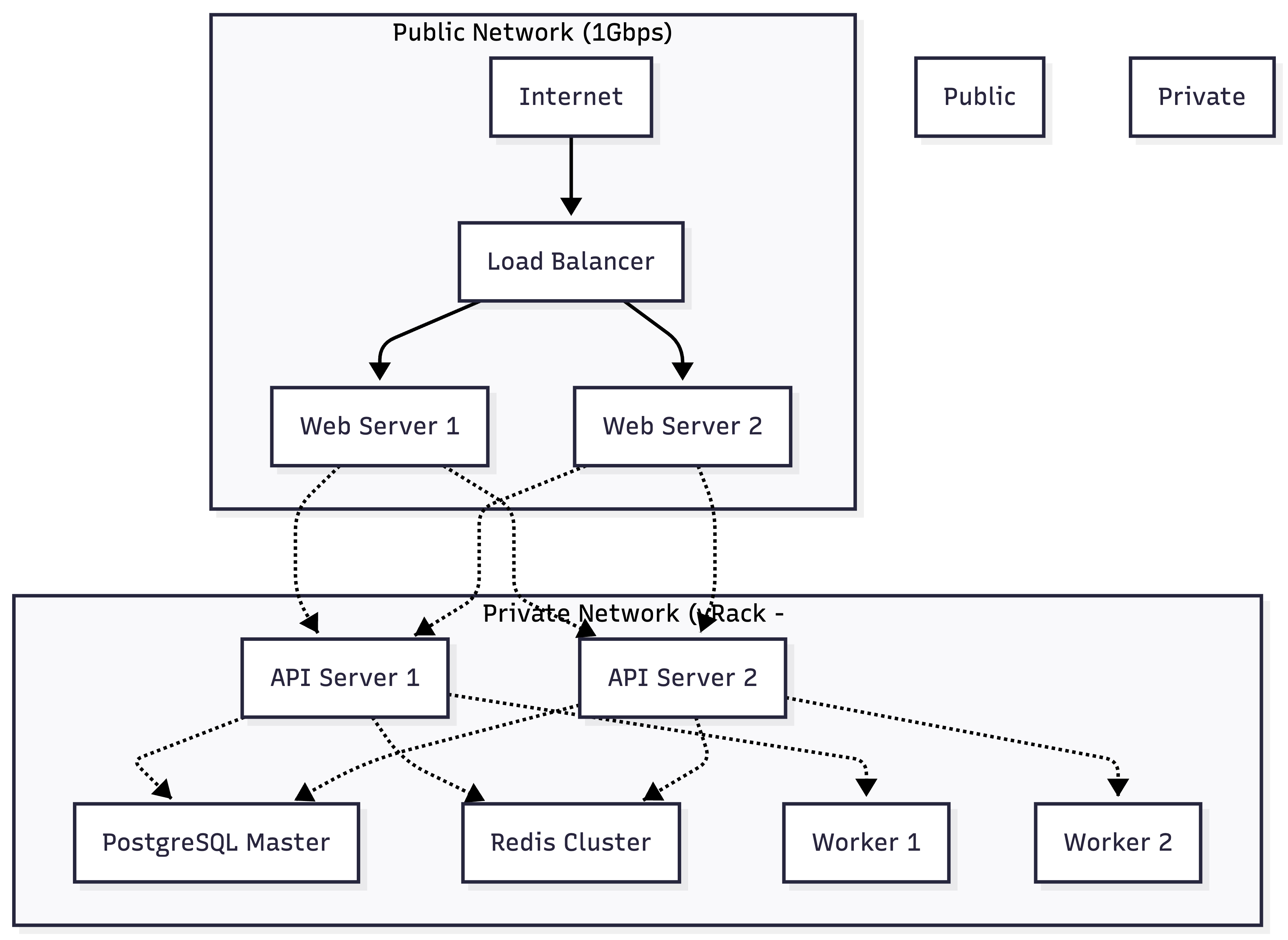
OVH vRack 구성
# vRack Private IP 할당
# .. 생략
# DB Slave: 10.0.3.11
# Worker 1-3: 10.0.5.10-12

# 네트워크 인터페이스 설정
cat > /etc/netplan/01-netcfg.yaml <<EOF
network:
  version: 2
  ethernets:
    eth0:  # Public
      dhcp4: yes
    eth1:  # Private (vRack)
      addresses:
        - 10.0.1.10/24
      routes:
        - to: 10.0.0.0/16
          via: 10.0.1.1
EOF

netplan apply
애플리케이션 설정 변경
# API 서버 설정 (기존)
database:
  host: 203.0.113.50  # Public IP (예시)
  port: 5432

# API 서버 설정 (변경 후)
database:
  host: 10.0.3.10  # Private IP (vRack) (예시)
  port: 5432
트래픽 분산 효과
| 항목 | 변경 전 | 변경 후 | 절감 |
| Public 트래픽 | 200 Mbps | 80 Mbps | 60% |
| 내부 통신 지연 | 2-5ms | 0.5ms | 75% |
| DDoS 대역폭 여유 | 20% | 60% |
네트워크 트래픽 모니터링 메트릭 추가
// Public vs Private 트래픽 구분
func collectNetworkMetrics() {
    // eth0: Public, eth1: Private (vRack)
    interfaces := []struct {
        Name string
        Type string
    }{
        {"eth0", "public"},
        {"eth1", "private"},
    }

    for _, iface := range interfaces {
        stats, err := net.IOCounters(true)
        if err != nil {
            continue
        }

        for _, stat := range stats {
            if stat.Name == iface.Name {
                networkBytesRecv.WithLabelValues(
                    iface.Name,
                    iface.Type,
                ).Set(float64(stat.BytesRecv))

                networkBytesSent.WithLabelValues(
                    iface.Name,
                    iface.Type,
                ).Set(float64(stat.BytesSent))
            }
        }
    }
}
Grafana 대시보드 구성
핵심 패널 구성
- 시스템 상태 오버뷰
- CPU/Memory/Disk 사용률 (Gauge)
- 네트워크 트래픽 (Graph - Public vs Private 구분)
- 전체 서비스 Health Status (Stat)
- PostgreSQL 모니터링
- Replication Lag (Graph)
- WAL 크기 추이 (Graph)
- Connection Pool 상태 (Bar Gauge)
- Slow Query 로그 (Table)
- 네트워크 트래픽
- Public 네트워크 사용량 (Graph)
- Private 네트워크 사용량 (Graph)
- Top Talkers (Table)
- DDoS 의심 트래픽 (Alert)
- 서비스 헬스
- 서비스별 응답 시간 (Heatmap)
- 에러율 (Graph)
- 요청 처리량 (Graph)
Critical 알림 설정
# Prometheus Alert Rules
groups:
  - name: critical_alerts
    interval: 30s
    rules:
      # Replication Lag 알림
      - alert: PostgreSQLReplicationLagHigh
        expr: postgresql_replication_lag_bytes > 100000000  # 100MB
        for: 5m
        labels:
          severity: critical
        annotations:
          summary: "Replication lag exceeds 100MB"
          description: "Slave {{ $labels.slave }} lag: {{ $value }} bytes"

      # WAL 크기 알림
      - alert: PostgreSQLWALSizeHigh
        expr: postgresql_wal_size_bytes > 50000000000  # 50GB
        for: 2m
        labels:
          severity: critical
        annotations:
          summary: "WAL size exceeds 50GB"
          description: "Current WAL size: {{ $value }} bytes"

      # 디스크 사용률 알림
      - alert: DiskUsageHigh
        expr: system_disk_usage_percent{mount_point="/"} > 85
        for: 5m
        labels:
          severity: warning
        annotations:
          summary: "Disk usage high"
          description: "/ partition {{ $value }}% used"

      # 서비스 다운 알림
      - alert: ServiceDown
        expr: service_health_status == 0
        for: 1m
        labels:
          severity: critical
        annotations:
          summary: "Service is down"
          description: "{{ $labels.service }} is unhealthy"

      # Public 네트워크 대역폭 알림
      - alert: PublicBandwidthHigh
        expr: rate(network_bytes_sent_total{interface="eth0",type="public"}[5m]) > 800000000  # 800Mbps
        for: 2m
        labels:
          severity: warning
        annotations:
          summary: "Public bandwidth usage high"
          description: "Current: {{ $value | humanize }}bps (possible DDoS)"

# Alertmanager 설정
route:
  group_by: ['alertname', 'severity']
  group_wait: 10s
  group_interval: 10s
  repeat_interval: 12h
  receiver: 'slack-critical'
  routes:
    - match:
        severity: critical
      receiver: 'slack-critical'
    - match:
        severity: warning
      receiver: 'slack-warning'

receivers:
  - name: 'slack-critical'
    slack_configs:
      - api_url: 'https://hooks.slack.com/services/XXX'
        channel: '#alert-critical'
        title: '{{ .GroupLabels.alertname }}'
        text: '{{ range .Alerts }}{{ .Annotations.description }}{{ end }}'
        send_resolved: true

  - name: 'slack-warning'
    slack_configs:
      - api_url: 'https://hooks.slack.com/services/XXX'
        channel: '#alert-warning'
        title: '{{ .GroupLabels.alertname }}'
        text: '{{ range .Alerts }}{{ .Annotations.description }}{{ end }}'
실제 효과
장애 대응 시간
- 이전: 평균 2~5 시간 (사용자 제보 → 원인 파악 → 복구)
- 이후: 평균 15분 (알림 → 대시보드 확인 → 복구)
장애 예방
- Replication Lag 경고로 1건의 잠재적 장애 사전 차단
- 디스크 사용률 알림으로 1건의 디스크 Full 방지
- DDoS 트래픽 조기 감지로 2건의 서비스 마비 회피
운영 효율
- 매일 대시보드 체크: 1분
- 연간 장애 대응 시간: 약 12시간 → 2시간
- 서비스 안정성: Uptime 99.2% → 99.8%
네트워크 최적화
- Public 대역폭 사용량 60% 절감
- 내부 통신 지연 75% 개선
- DDoS 공격 대응 여력 확보 (20% → 60%)
교훈
- 모니터링은 사치가 아니라 필수다
- 장애는 "만약"이 아니라 "언제" 일어나느냐의 문제
- 작게 시작해서 점진적으로 확장
- 처음부터 완벽한 모니터링 구축 X
- 핵심 메트릭부터 시작 → 필요에 따라 추가
- 알림 피로도 관리
- 너무 많은 알림 = 알림 무시
- 심각도 구분 + 임계치 튜닝 필수
- 네트워크는 유한한 자원이다
- Public/Private 분리로 비용과 성능 동시 개선
- 내부 통신을 Private으로 돌리는 것만으로도 효과 큼
'실무 경험 > 실무 개발 & 협업' 카테고리의 다른 글
| [블록체인] - Integer overflow 와 underflow (0) | 2025.04.21 |
|---|---|
| 2022 - 휴가 쓰자마자 우마카세에서 삼겹살로 강등당한 사연: 크리스마스 전전날의 악몽 (TLS 이슈) (0) | 2024.02.29 |
| 2023 - Bulk Mailler 실종 사건 (0) | 2024.02.29 |
| [문서화] - API 문서 도입 + 작성하기 (0) | 2024.02.16 |
| 2022 - TLS 1.0, TLS 1.1 지원 중단으로 인한 TLS 버전 업그레이드 회고 (0) | 2024.02.10 |
